How I Build and Ship with Agents
My workflow for building and shipping with agents, from gathering requirements and reviewing the design to automated verification and user journeys, without human code review.

On our team, agents write all of the code, and no human reviews it.
I have been working at the cutting edge of agentic AI, both using agents to build and ship products and building the agentic experience for customers. Over time, I have developed a set of guidelines that I regularly use in my personal and professional work to build and ship with confidence.
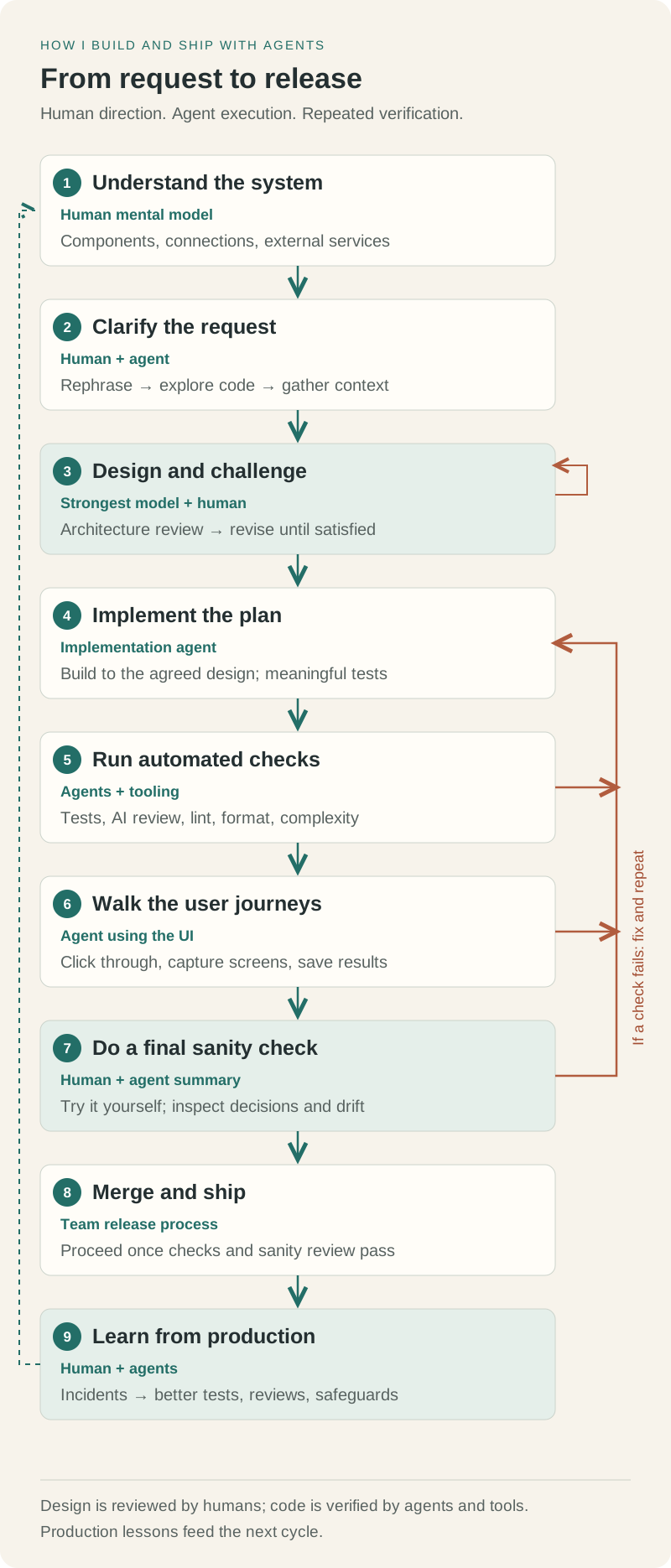
The workflow starts with understanding the project and gathering requirements, then moves through design, implementation, verification and a final sanity check.
Understanding the Project and the Request
You need a mental model of the project: its systems, components and how they connect, to the point where you can draw it on a whiteboard. You do not need a precise understanding of the code, just the high-level design of the systems you own and how they interact with each other and external services.
When working on a new feature, describe your request and ask the agent to rephrase it before starting work. This helps check whether you have explained it properly or missed key details. For example: “I want to implement this feature like this. Can you rephrase my request so we are aligned?”
Then ask the agent to ground its understanding in the codebase and rephrase the request again. This is a different step: the agent explores the source code to check your description and identify gaps in your understanding that need to be filled.
Ask the agent to gather requirements across sources like Slack, Linear, GitHub and Notion too. This builds a clearer understanding of the feature, including stakeholder discussions and other relevant context.
Designing and Reviewing the Solution
You can use your computer science and programming knowledge to design a solution yourself, like how you would fix a bug or add a feature based on your mental model, or ask the agent to design an optimal solution. Review the proposed or grounded solution for anything that does not align with the product/project vision, goals or the design you had in mind.
Once the design is ready, ask the agent to stress-test it and do an adversarial review. This is an architecture review of the design from various angles: product constraints, feasibility, complexity and so on.
Read the issues it finds and ask it to fix them. It can propose solutions, or you can suggest fixes and ask it to redesign. Repeat until you are satisfied with the design.
The initial requirements gathering, design discussion and plan finalization should be done by the most powerful model, like GPT-6-Astra. Implementation can then be done by lighter, less powerful models like GPT-6.1-Sol.
Implementation and Automated Verification
Once you are satisfied with the design, ask the agent to implement it and check that the implementation works as designed. You can switch to another ticket/worktree. I usually keep ~5–10 parallel threads at a time.
Newer models like GPT-6.1-Sol and Opus 5.5 usually write tests, but you can explicitly ask them to. One thing I found useful is asking for tests that cover meaningful cases, rather than a lot of unit tests that add little value.
Once implementation is complete, verify it: test suites, automated AI reviews against guidelines, linting, formatting and other checks like complexity measurement. Ask the agent to run these while writing code or at the end, depending on how long the full suite takes. This is usually part of preparing the PR.
Testing the User Experience
After automated verification, ask the agent to mimic a real user. Instead of writing Playwright scripts, have it capture screenshots and click through the UI, checking for UI/UX defects and functionality problems at each step. Save the full scenario for later review.
You can write these user journeys in natural language and have agents run them mostly reliably, then review the results later. If a check fails, ask the agent to fix the implementation and repeat until everything passes.
The Final Sanity Check
Once the automated checks and user journeys pass, do a final sanity check by running through it yourself. Ask the agent to summarize the original task, how it implemented it and any decisions that caused the direction to drift.
At this stage, we are usually ready to merge the PR. If not, give feedback and repeat the cycle.
How This Has Changed My Work
With this approach, I have been able to ship ~50k–100k lines of code per week, averaging ~5–10 PRs/week. Lines of code are not a good measure of value or quality, but they give a sense of the scale of work I am shipping.
We also sometimes break things in production. We learn from those incidents and improve our process by adding more automated tests, automated code reviews and safeguards.
It feels like we software engineers have become an intersection of Project Manager, Product Designer and Solution Architect, while AI agents are the coders working under us.