Cloud Run
Overview of Google Cloud Run and how serverless containers can simplify deployment, scaling, and cost management for ML applications.
- Snapshot
- Google Next 2019
- Core idea
- Serverless containers
- Scale model
- Scale to zero
- Example
- Flask + Docker
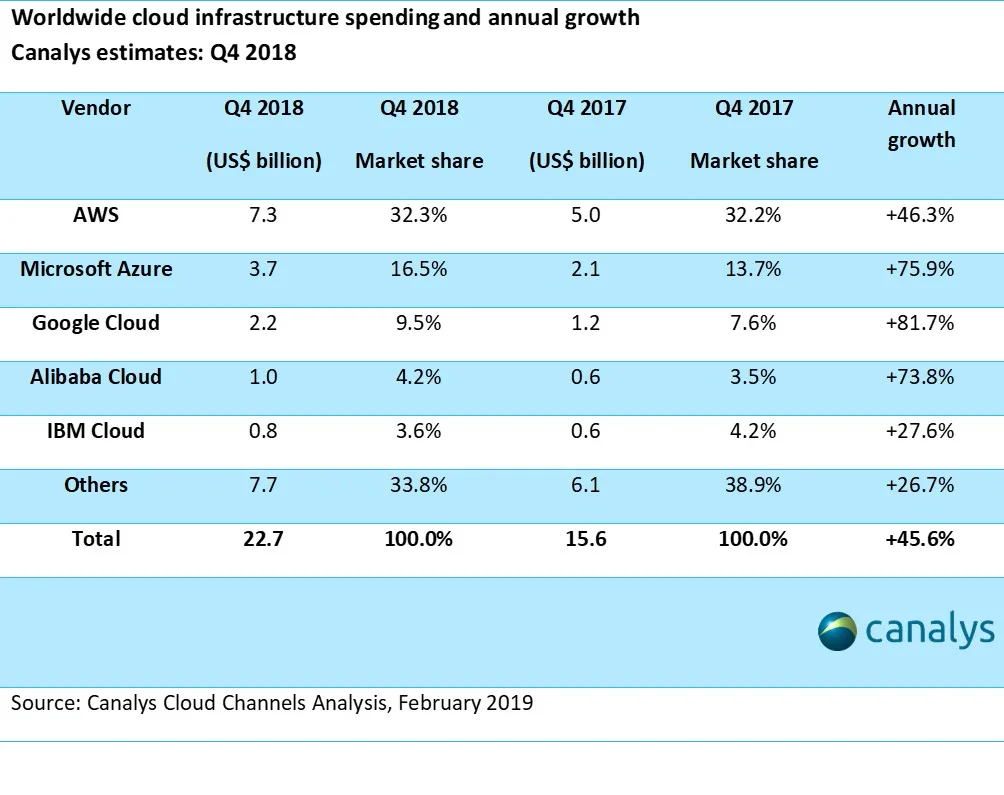
Google Cloud Platform was growing quickly, and one thing that stood out to me was simplicity. As a developer or DevOps engineer, you could start with a few clicks and move into deeper configuration later.
Around Google Next 2019, Google announced several platform updates. The one I cared about most was Cloud Run: a way to run containers with serverless-style scaling.
Future Tech Brought by Google
At the time, Google Cloud had one of the strongest cloud growth stories. The bigger point for builders was practical: GCP was making more infrastructure feel approachable, especially for small applications and experiments.
The original article referenced Google Cloud's annual growth report from Canalys: cloud market share, Q4 2018 and full-year 2018.
The Evolution of Computing
Serverless Computing
Serverless computing became popular because it lets microservices cost money only when they are used. Traditional hosting keeps virtual machines running all the time, so you keep paying whether traffic is present or not.
Serverless had tradeoffs. You often had to follow a cloud provider's structure, accept vendor lock-in, and work within limited language or framework support.
Containers
Containers solved a different problem. They let developers ship an application with its dependencies in a portable package. The downside was that container hosting usually still meant keeping something running all day.
The Perfect Combination
Cloud Run combined the two ideas I wanted: package the application as a container, but pay only when users actually call it.
| Approach | What it gives you | What hurts |
|---|---|---|
| Serverless | Pay only when used, automatic scaling, less server management. | Provider rules, lock-in, limited runtime flexibility. |
| Containers | Portable apps, flexible project structure, broader language support. | Usually always-on infrastructure and 24/7 cost. |
| Cloud Run | Container packaging with serverless-style scale-to-zero. | Still limited by serverless compute constraints. |
Real-World Example: Flask to Cloud Run
If you use Python and built a web server using Flask, you might host it on a server that runs all day whether users visit or not. I tried to move a Flask app to AWS Lambda and found the framework shift to Chalice more awkward than I wanted.
With Cloud Run, the workflow felt direct: package the Flask application as a Docker container and deploy it as a serverless service. No major project restructure was the appeal.
Current Limitations
Cloud Run still had limitations. Compute resources were more constrained than a traditional VM, and the service was stateless, so containers could not attach persistent volumes in the same way.
You could use Cloud Run on GKE for more control, but then it would no longer be fully serverless and you would lose part of the scale-to-zero benefit.
Future of Cloud Computing
Cloud Run felt like an early sign of where application hosting was going: fewer always-on servers for small services, simpler container deployment, and easier economics for experiments.
The companion tutorial shows how to package an existing deep learning Flask app and deploy it to Cloud Run: Deploy Machine Learning Model in Google Cloud using Cloud Run.
Official documentation is available at Cloud Run documentation.